Getting Started
Overview
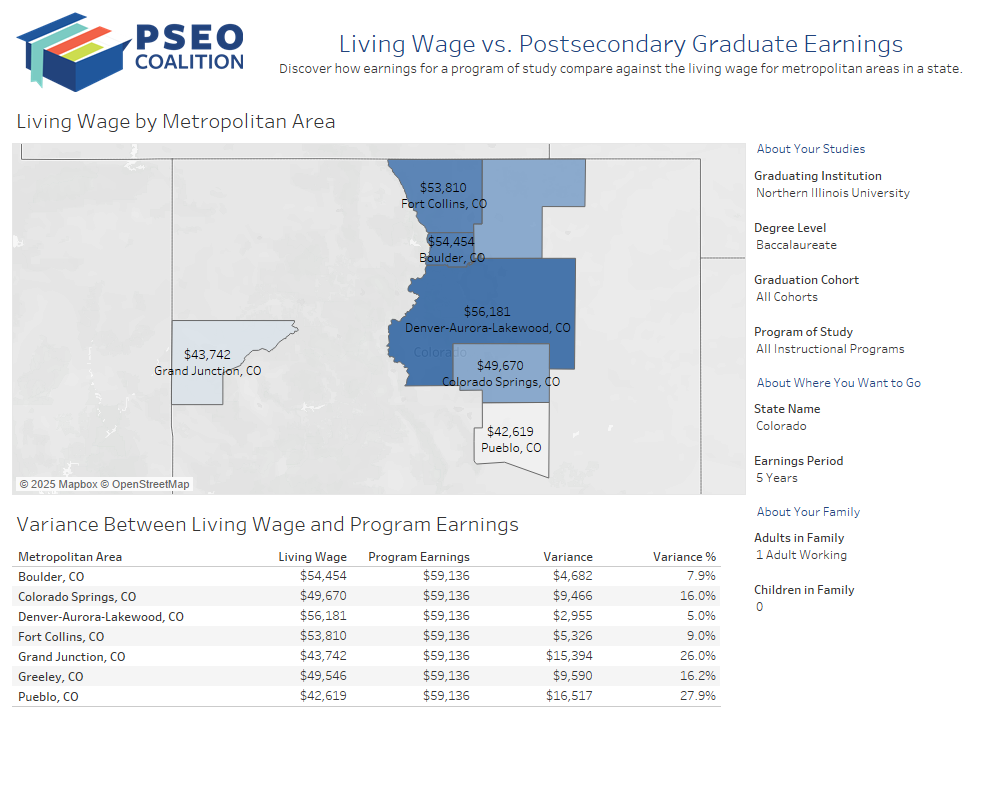
The Living Wage vs. Postsecondary Graduate Earnings tool comprises two major sections: filters and a table. The filters are located above the table and are all single-value drop-down boxes. Below the filters is a table showing the variance between the living wage for those areas and earnings from the Postsecondary Employment Outcomes (PSEO) data set.
Understanding the Visualizations
Variance Between Median Earnings and Living Wage (Table)
Above the table is a box that reports the median earnings from postsecondary graduates in the selected program of study at an institution. Below that in the table next to each metropolitan area in the destination state are three columns with living wage and earnings data:
Living Wage for this City: Displays the living wage for the metropolitan area and family configuration.
Variance from Program Earnings: Displays the nominal difference between the living wage and program earnings.
Variance % from Program Earnings: Displays the percent difference between the living wage and program earnings.
Using the Filters
The filters in this tool allow the user to narrow earnings data to a particular subset if desired. These filters are grouped into three sections to help the user make their selections more easily:
About Your Studies
Filters in this section pertain to where and what the student studied:
Graduating Institution
Use this filter to select the institution awarding a credential. Use the search box that appears with the drop-down box to search for a particular college or university in the list.
Degree Level
Use this filter to select a degree level for analysis.
Program of Study
Use this filter to select a high-level program of study, such as Engineering. Select All Instructional Programs to review earnings data for all programs.
Graduation Cohort
Use this filter to select a specific cohort for analysis. Select All Cohorts to review earnings data across all cohorts available.
After Graduation
Filters in this section pertain to where the student wants to go after graduation and the earnings period:
Earnings Period
Use this filter to select the period after graduation to review earnings data for: 1 year, 5 years, or 10 years.
Destination State
Use this filter to select a destination state for analysis.
Adults in Family
Use this filter to select the number of working adults in the family.
Children in Family
Use this filter to select the number of children in the family.
Additional Notes
The filters in this tool are context-dependent, and the values for each one will update based on the values selected in other filters.
In some cases, there may be no data available for a particular intersection of filter values. For example, once Masters has been selected as a value for Degree Level, only data for programs of study available at that level for the selected institution will be displayed.
Values in each of the filters are based on available data from the PSEO Explorer. Summary data for all categories in a filter are available for all filters except State Name, Degree Level, Adults in Family, and Children in Family - a specific value must be selected for each of these.